OTA Updates in React Native: what changes, what doesn't, and why
You find a critical bug in production, fix one line of JavaScript, and technically the problem is solved:
- const total = price + quantity;
+ const total = price * quantity;
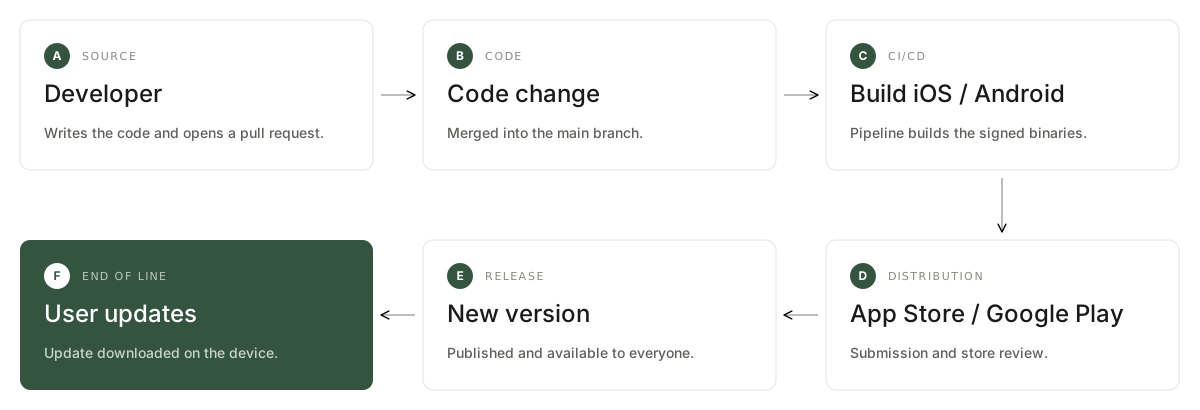
But your users still don't have the fix. In the traditional flow you'd have to rebuild the app, submit to the stores, wait for review, and hope people update. That's a lot of process for a swapped operator.
This is where OTA Updates — over-the-air updates — come in.
This article isn't a deployment tutorial. The question it wants to answer is a different one:
How does an app already installed on a phone end up running JavaScript that never came from the App Store?
We'll use Bitrise CodePush as the main case study, with Expo's EAS Update as a counterpoint.
Part 1 — The concept
OTA is the concept, CodePush is one implementation
You often hear "let's implement CodePush" and "let's implement OTA" used interchangeably. They aren't the same thing.
OTA is the idea of shipping updates straight to an already-installed app, without pushing a new .ipa, .aab or .apk through the store. CodePush and EAS Update are two implementations of that idea — and there are others, including self-hosted servers, since the expo-updates protocol can be implemented by any service.
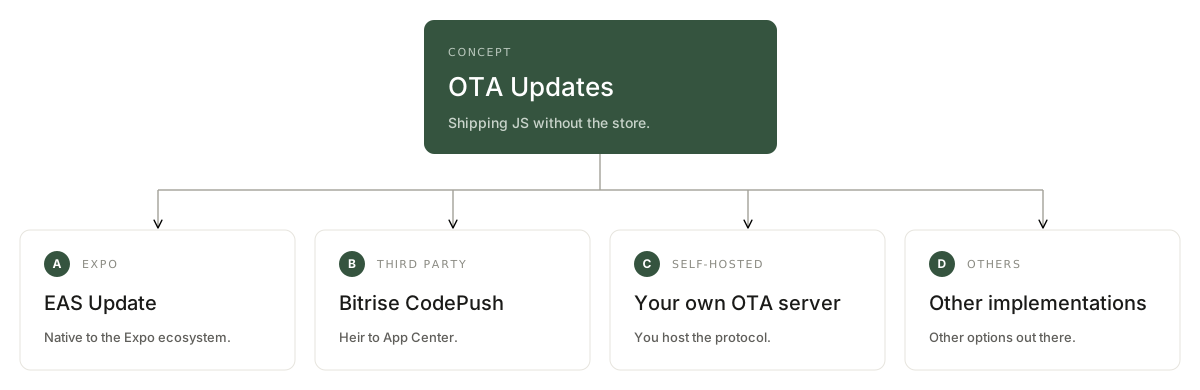
A bit of history is worth it here, because it explains the current state of the ecosystem. CodePush was born at Microsoft, inside Visual Studio App Center. Microsoft retired App Center, hosted CodePush included, on 31 March 2025. The protocol and the SDK survived, and today Bitrise operates a hosted service.
According to the Bitrise documentation, the product has two parts: CodePush inside Bitrise Release Management, where you publish, roll out and manage updates; and the SDK that sits inside the app, responsible for handling available updates. The SDK supports React Native's New Architecture and Expo projects.
Part 2 — Why React Native allows this
The two layers
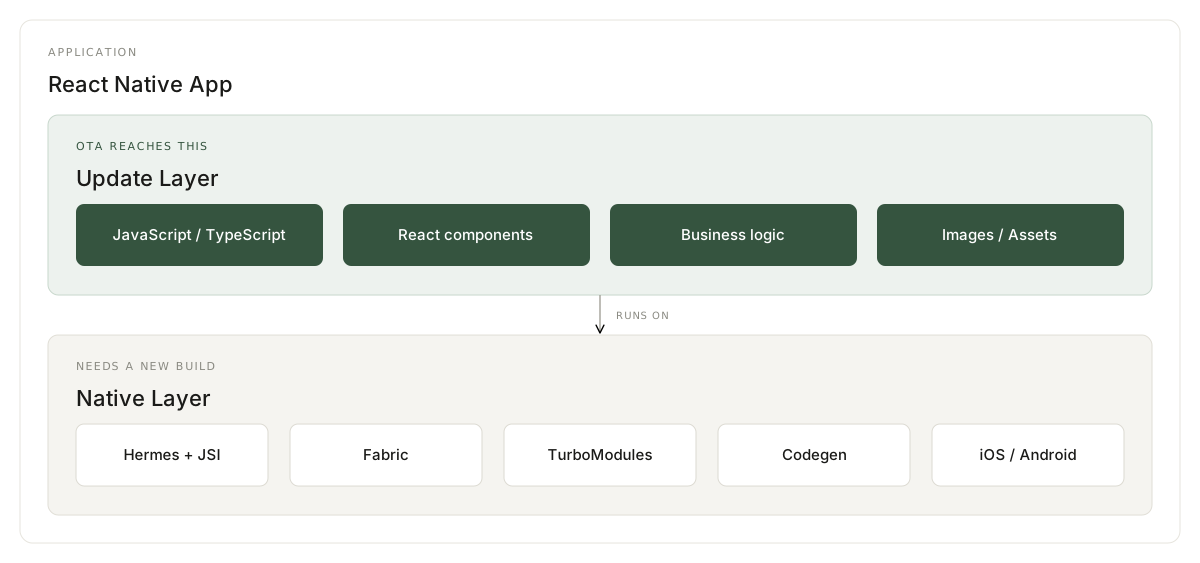
To understand OTA you first have to drop the idea that a React Native app is a single thing. It has two layers.
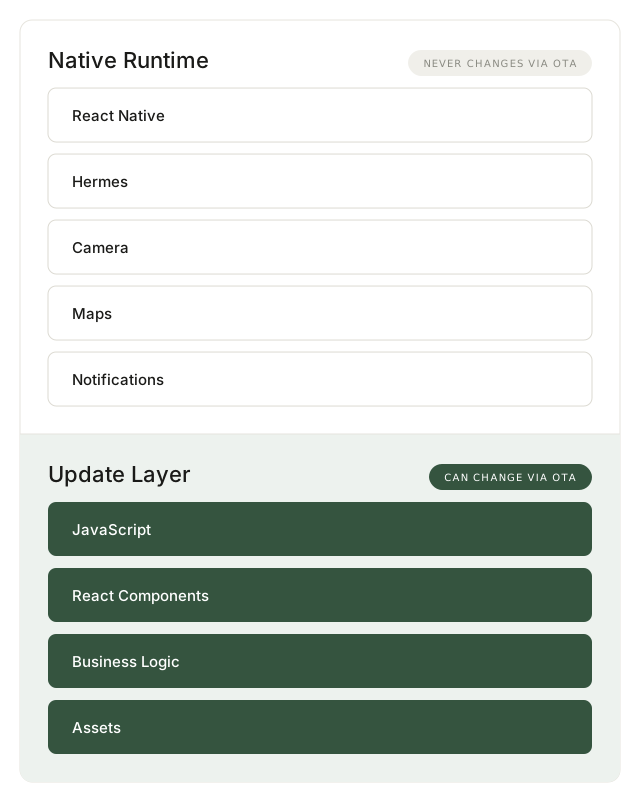
This split isn't a teaching device someone invented. Expo uses exactly this framing in the EAS Update documentation: builds can be thought of as two layers, a native one baked into the binary and an update layer that is swappable with other compatible updates. It's that separation that makes it possible to ship fixes to builds already in the field, as long as the update can run on the build's native layer.
Everything else follows from this. The rest of the article is consequence.
What Metro does to your JavaScript
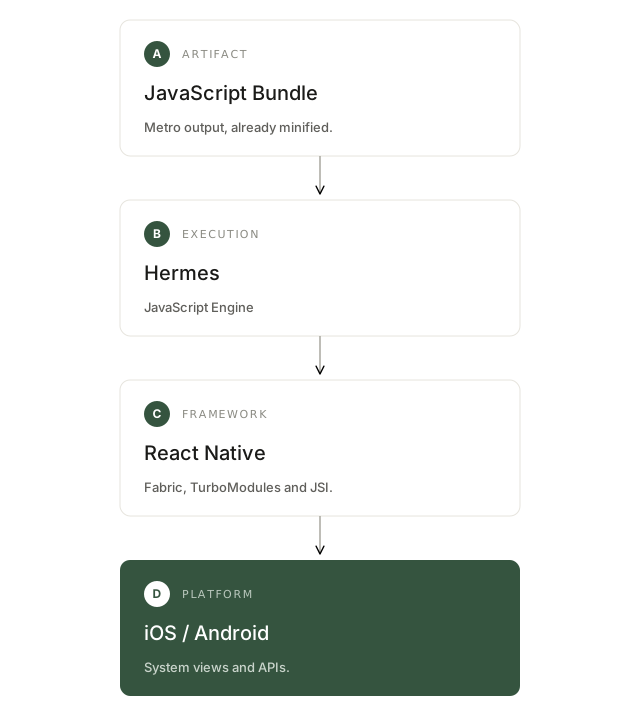
During development you have hundreds of files under src/. The device doesn't run that structure. Metro turns all of it into a bundle.

That bundle is embedded in the binary the store distributes. It's what the runtime loads when the app opens.
Hermes, and why it matters more than it looks
JavaScript needs an engine. In modern React Native apps that engine is Hermes, the default since 0.70 and the only supported one under the New Architecture.
Here's the detail most OTA articles skip: Hermes doesn't interpret JavaScript in production. It executes bytecode compiled ahead of time, at build time. That's what removes the parsing cost from cold start.
The consequence is direct and expensive, and the Expo documentation is explicit about it: the Hermes bytecode format can change between versions, and an update produced for one specific Hermes version will not run on another. Since Expo SDK 46, Hermes ships bundled inside React Native, so updating the React Native version should be treated like updating any other native module — if you don't track that in your versioning, the app may crash on launch, because the update will be loaded by an existing binary whose Hermes is incompatible with the new bytecode.
In other words: the package you publish over the air isn't "just JavaScript". It's a compiled artifact, bound to the binary that will execute it. Hold on to that — we'll come back to it in the compatibility section.
The trick: one line that decides which bundle to load
Now the central question: where does the bundle handed to the runtime come from?
Without OTA, from the binary. With OTA, there's native code capable of picking a different file. And the mechanism is literally a one-line substitution in native startup.
On iOS, configuring CodePush swaps out bundle resolution in release builds:
#else
-     Bundle.main.url(forResource: "main", withExtension: "jsbundle")
+     CodePush.bundleURL()
  #endif
On Android, the equivalent is pointing jsBundleFilePath at CodePush.getJSBundleFile(). Bitrise's own documentation describes the behaviour in a code comment: resolve the bundle path at startup, using the OTA update if one is available and falling back to the bundled JS otherwise.
That's it. Everything else — server, CDN, rollout, signing — is infrastructure wrapped around that decision.
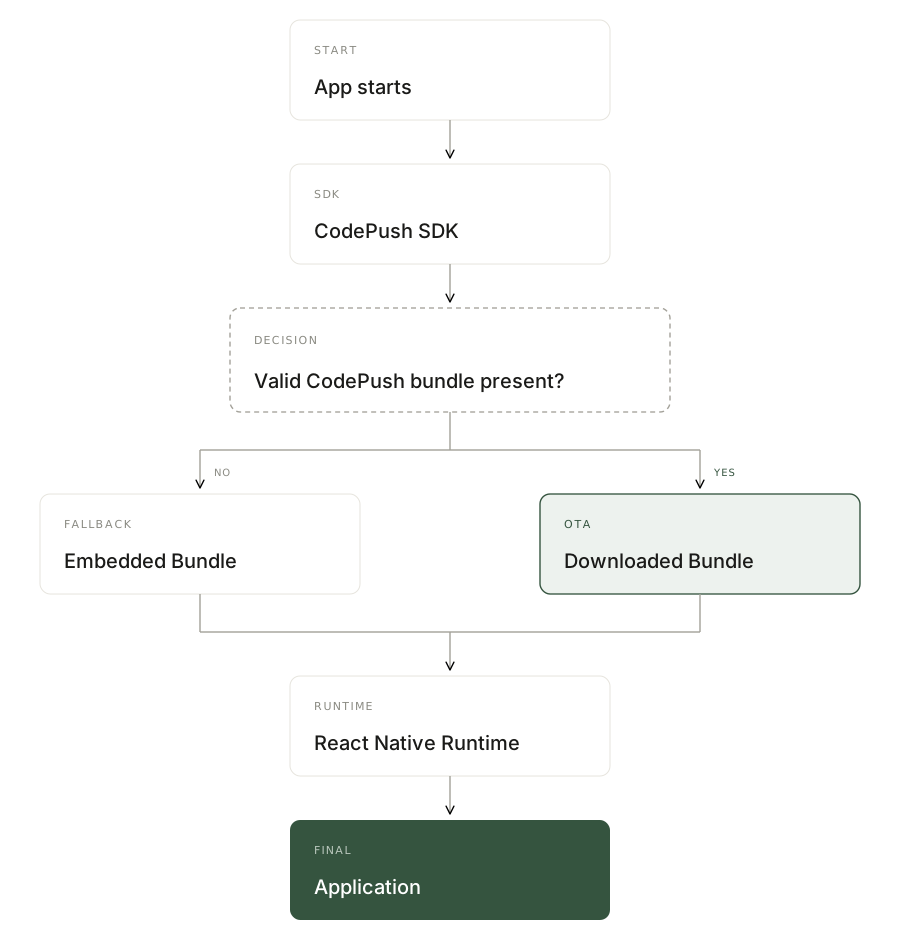
The native app wasn't replaced. What changed is only which code the runtime will load.
Note also that the swap applies to release only. The #if DEBUG block keeps the Metro packager in debug builds, so live reload and dev tools keep working.
Part 3 — The limits
What can't be updated
The same split that gives OTA its power defines its limitation. If the new JavaScript calls a native API that doesn't exist in the installed binary, the result is an error or a crash.
Expo describes exactly this scenario: imagine a build with runtime version 1.0.0 already released to the stores. Later you develop an update that depends on a newly installed native library, like expo-camera, and you don't change the runtime version. Builds on runtime 1.0.0 will consider the update compatible and try to load it. Since the update calls code that doesn't exist inside the build, expo-updates may detect the error and try to roll back to the previously working update.
Goes over the air: JavaScript, React components, business logic, styles and assets.
Needs a new build: adding or removing native modules, touching Swift, Objective-C, Kotlin or Java, changing capabilities and permissions, and — per the section above — bumping the React Native or Hermes version.
One caveat when reading the two-layer diagram: when it lists Camera, Maps or Notifications as immutable, that applies to those libraries' native SDK. The screen that calls the camera, the handling of a denied permission, the component that renders the map — all of that is JavaScript and updates normally.
There's also a trap specific to the New Architecture. TurboModule and Fabric component specs are written in TypeScript, so they look like updatable code. But Codegen turns them into native code during the build. Creating a new TurboModule, or changing the signature of an existing one, requires a rebuild even if all you edited was a .ts file.
Compatibility: the real problem
Not everyone updates. In production you have several binary versions running at once, and a published update needs to know which of them it's safe for.
The two platforms solve this differently.
Bitrise CodePush uses target versions. You state the app version when uploading the package, and only devices running that version receive it. Range expressions are accepted: 1.2.3 hits only that store version; * hits any device configured to consume updates; 1.2.x covers any patch of minor 2; 1.2.3 - 1.2.7 covers the range with both ends included; >=1.2.3 <1.2.7 excludes the upper bound; and the ~1.2.3 and ^1.2.3 operators follow the semver convention.
EAS Update uses runtimeVersion, which is more explicit about what's being versioned. The runtime version describes the JS-native interface defined by the native layer that runs the update layer. Whenever you change native code in a way that alters that interface, you need to change the runtime version.
And the compatibility rule is strict: the platform of the build and of the update must match exactly, and the runtime version of the build and of the update must match exactly. There is no range.
runtimeVersion accepts policies that derive the value automatically. The default set by eas update:configure is the appVersion policy, which keeps the runtime version always equal to the app version — the native version users see in the store, without the build number. But that policy has a known gap, and the documentation is honest about it: appVersion increments the runtime version along with the app version, but if you forget to bump the version when touching the native runtime, you'll end up with a mismatch. If you want to make incompatible updates extremely unlikely, at the cost of building more often, there's the fingerprint policy, which increments the runtime version whenever anything capable of affecting the native runtime changes.
The difference in philosophy is interesting. Target versions ties the update to the app's commercial version; runtimeVersion ties it to the technical contract between JS and native. The second is more precise, but demands discipline to keep the field correct.
What the stores say
Being technically possible doesn't mean being allowed.
Guideline 2.5.2 of App Review says apps should be self-contained in their bundles and may not download, install or execute code that introduces or changes app features. Read on its own, it would appear to forbid OTA entirely.
The opening is in the developer agreement. Section 3.3.1(B) of the Apple Developer Program License Agreement allows interpreted code to be downloaded to an application, as long as it doesn't change the app's primary purpose by providing functionality inconsistent with what was submitted.
That's why React Native, which downloads and executes JavaScript, coexists with the App Store — and why "vibe coding" apps that generate arbitrary functionality at runtime have been pulled under the same guideline.
The practical principle:
OTA is for shipping fixes and changes compatible with the app that was approved. It is not a mechanism for quietly turning the app into a different product.
Policies change. This belongs in your team's release process review, not just in the technical implementation.
Part 4 — Operating safely
Deployments and gradual rollout
Pushing an update straight to every user is risky. Both systems work with separate environments.
In CodePush these are deployments, each with its own deployment key. The standard setup is Staging and Production: test in the first, promote to the second.
One security detail that regularly causes confusion, and which the documentation warns about: deployment keys end up as plain string values in final app builds. They are not secrets, but they are unique to your workspace and your deployment setup. There's no point hiding them; real protection comes from signing, further down.
EAS structures this differently, and it's worth understanding why it's more flexible. An update is published to a branch, a server-side object holding a list of updates where the most recent is the active one — the Git analogy is direct. Each build carries a channel, and a channel can be linked to any branch; by default, to one of the same name.
That indirection between channel and branch is what lets you promote an entire version without republishing anything: you repoint the production channel at another branch and apps start receiving those updates.
Either way, start small. In CodePush, the rollout percentage is set when publishing the update and can be raised later; the default is 100%. The obvious advice is not to leave it at the default for risky releases.
When uploading the package in CodePush you also set whether it's Enabled, whether it's Mandatory (which forces the user to update immediately), and its reach. Accepted files are .bundle, .jsbundle or .zip, with a maximum size of 50 MB.
When the update gets applied
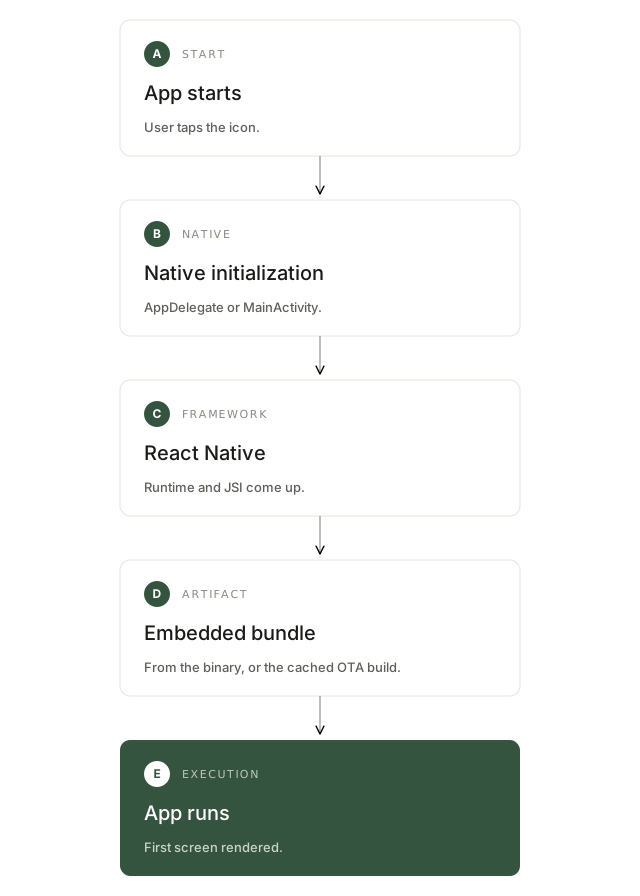
The SDK's default behaviour is silent. The app downloads available updates automatically and applies them the next time it restarts, without the user ever seeing a dialog.
This explains the most common beginner question: you publish the update, open the app, and nothing changes. That's expected. On that launch the runtime had already loaded the old bundle; the download happened in the background. The swap shows up on the next launch.
You can change this. The SDK exposes install modes: apply when the app returns from background, or immediately, with or without a dialog asking the user's permission. When an update carries the mandatory flag, the user is notified but has no option to ignore it.
Rollback: the mechanism that prevents disaster
Here's the most interesting problem in any OTA system.
Imagine v3 prevents the app from starting. Publishing v4 may not help — the app might not stay open long enough to download it. Without a client-side safety net, you've just bricked your installed base, and the only way out is an emergency store submission.
CodePush solves this with an explicit confirmation. A freshly installed update stays provisional until the app declares it came up fine. In the words of the API reference, it is mandatory to call that function somewhere in the updated bundle's code. Otherwise, the next time the app restarts, the CodePush runtime will assume the installed update failed and roll back to the previous version.
In practice you rarely call it by hand, because if you use the sync function and do your update check on app start, you don't need to call it manually — sync calls it for you, on the assumption that the point where sync runs is a good approximation of a successful startup.
Two consequences worth designing around:
If you call sync too early, on first render, you're declaring success before you know the app works. Automatic rollback loses its usefulness. Calling it after verifying that navigation came up and essential requests responded is safer.
And if you manage updates manually, without sync, forgetting the confirmation makes every update revert on the next restart — the app gets stuck on the embedded version and the symptom looks like a server bug.
There's also server-side rollback, which stops new users from receiving a bad release once it's been identified. The two mechanisms are complementary: the client one saves whoever already installed, the server one stops the spread.
EAS Update has its own error recovery mechanism, with the same intent.
Signing: the trust model
We're letting a remote server send code for the app to execute. That needs a stronger guarantee than "it came from the right URL".
CodePush code signing works in three stages. First, you generate an RSA keypair: the private key signs the bundles, the public one is embedded in the app. Second, when releasing an update, the CLI signs the bundle with the private key, creating a JWT containing the bundle's hash. Third, the app — with the embedded public key — verifies the JWT signature before applying the update; if verification fails, the update is rejected.
The feature requires version 5.1.0 or later of the SDK.
This changes the question the app asks. Instead of "did this file come from the right server?", it asks "was this update signed by whoever holds our private key?". Since deployment keys aren't secrets, signing is the only real defence against a tampered package.

What OTA costs
Almost all writing about OTA is advocacy. It's worth being honest about the price.
Support complexity. You stop having one app version and start having two dimensions: the native version and the bundle version. "What code is this user running?" becomes a genuinely hard question, and your support team needs to be able to answer it.
One more SDK. Additional native code in the binary, making a request during the app lifecycle and writing to the filesystem.
Policy risk. Stores can revise their reading of the rule at any time, and your release strategy depends on it.
Versioning discipline. The classic mistake is updating a native dependency and forgetting to change the runtime version or the target. The system won't warn you — your users will.
Real cost. Bitrise's model charges by monthly active users, data transfer and storage, not by number of updates.
Part 5 — Comparison and mental model
CodePush and EAS Update side by side
Both solve the same problem: delivering a new update layer to an already-installed native runtime. What differs is the ecosystem and the abstractions.
| | Bitrise CodePush | EAS Update |
| --- | --- | --- |
| Client | `@bitrise/code-push-sdk` | `expo-updates` |
| Backend | Bitrise Release Management | EAS |
| Compatibility | Target versions (ranges) | `runtimeVersion` (exact match) |
| Environments | Deployments | Channels + branches |
| Gradual rollout | Yes | Yes |
| Code signing | Yes (RSA + JWT) | Yes |
| Bare React Native / Expo | Yes / Yes | Yes / Yes |
There's an implementation difference in the download worth knowing. expo-updates downloads in two phases: first the most recent manifest, which describes the update and lists the required assets; then only the assets not already downloaded from prior updates. If the manifest and all assets arrive within fallbackToCacheTimeout, the update runs immediately on launch; otherwise the download continues in the background and it runs on the next launch.
That asset reuse is why keeping updates small matters: only what changed goes over the wire.
And Expo's fallback cascade is a good summary of how these systems think: if it doesn't find a newer update, the library runs the most recent downloaded update, falling back to the update embedded in the build if none have been downloaded. The embedded bundle never stops being necessary — it's the safe floor for someone who installs the app and opens it with no connection.
The mental model
If you take one thing from this article, take this.
An installed app has two layers. The native one comes from the binary and only changes through the store. The update layer is swappable and can arrive over the air, as long as it stays compatible with the native layer that will execute it.
Everything else exists because that compatibility isn't automatic. Targeting, runtime versions, deployments, rollouts, signing, rollback and monitoring aren't extra features of a platform — they're answers to problems that appear naturally once you let an installed app run code that evolves separately from its binary.
So, a definition:
OTA is the ability to evolve an application's JavaScript layer without replacing its native layer — as long as the two keep speaking the same language.
And a good share of the engineering work is making sure they do.
Sources
- About CodePush — Bitrise Docs
- Configuring your mobile app for CodePush — Bitrise Docs
- Creating and releasing CodePush updates — Bitrise Docs
- Code signing with CodePush — Bitrise Docs
- How EAS Update works — Expo Docs
- Runtime versions and updates — Expo Docs
- Deploy updates — Expo Docs
- Using Hermes engine — Expo Docs
- React Native Client SDK API reference — CodePush
- App Store Review Guidelines 2.5.2 and DPLA 3.3.1(B)